> ## Documentation Index
> Fetch the complete documentation index at: https://dify-6c0370d8-add-new-agent.mintlify.site/llms.txt
> Use this file to discover all available pages before exploring further.

# Step 4: Upload Files

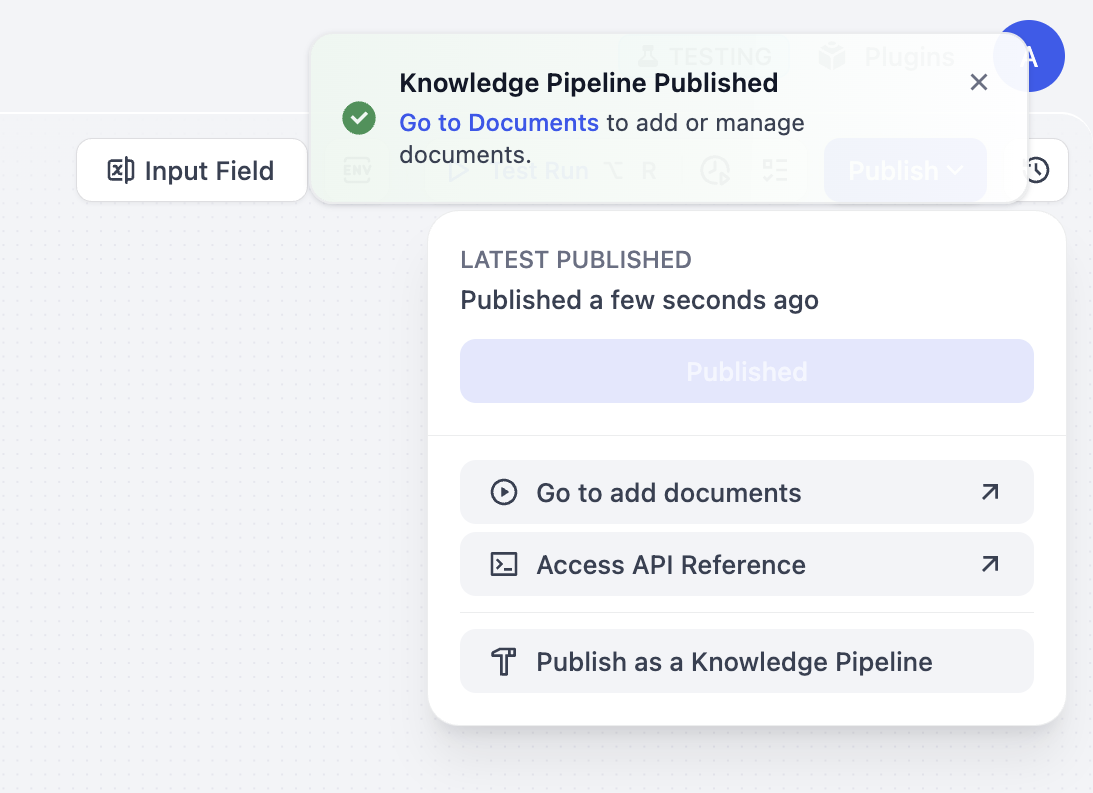
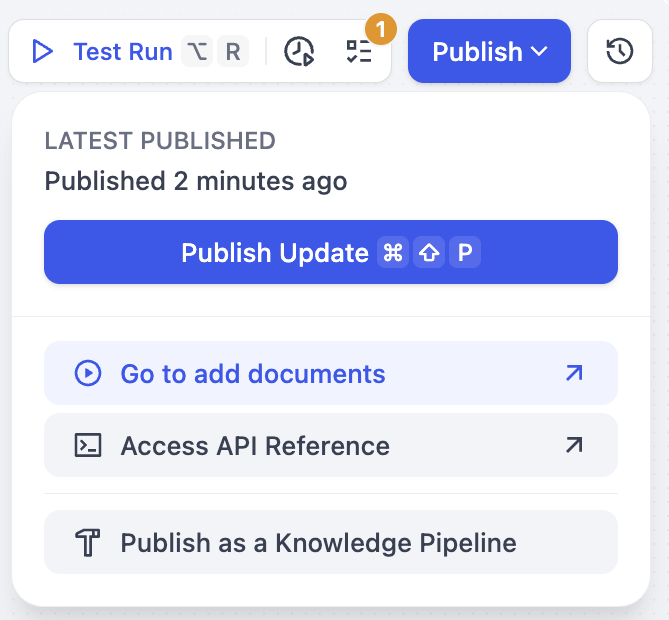
After publishing knowledge pipeline, there're two ways to upload files as below:

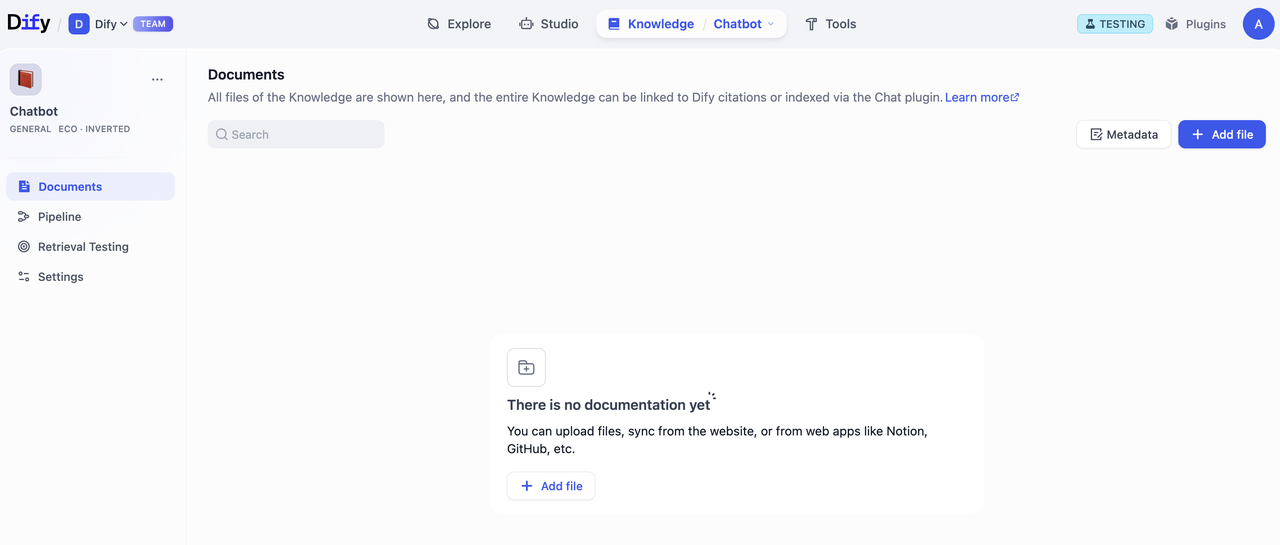
A: Click **Go to Documents** in the success notification to add or manage documents. After entering Documents page, click **Add File** to upload.

<div style={{display: 'flex', flexWrap: 'wrap', gap: '30px'}}>
  <div style={{flex: 1, minWidth: '200px'}}>
    <img src="https://mintcdn.com/dify-6c0370d8-add-new-agent/Lg4D_pUS5gs8ND0D/images/knowledge-base/create-knowledge-pipeline-14.png?fit=max&auto=format&n=Lg4D_pUS5gs8ND0D&q=85&s=e808fab058a4a21b8c6103c27f5039ba" alt="Option A-1" width="1093" height="793" data-path="images/knowledge-base/create-knowledge-pipeline-14.png" />
  </div>

  <div style={{flex: 2, minWidth: '300px'}}>
    <img src="https://mintcdn.com/dify-6c0370d8-add-new-agent/Lg4D_pUS5gs8ND0D/images/knowledge-base/create-knowledge-pipeline-15.png?fit=max&auto=format&n=Lg4D_pUS5gs8ND0D&q=85&s=bf9961ec823edcebb28c193eec80ca2c" alt="Option A-2" width="1280" height="545" data-path="images/knowledge-base/create-knowledge-pipeline-15.png" />
  </div>
</div>

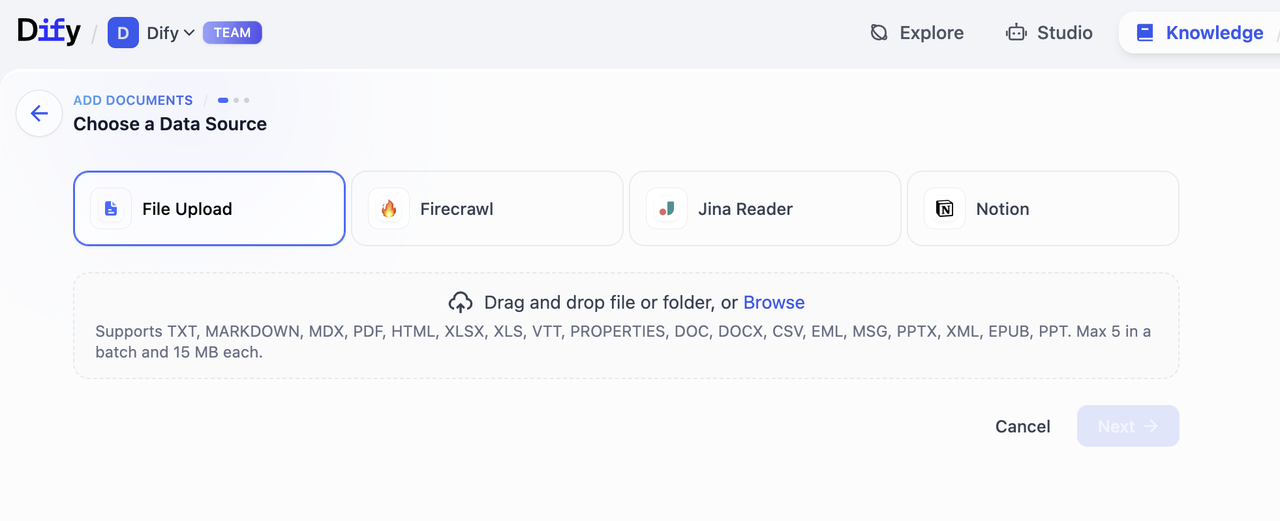
B: Click **Go to Add Documents** to add documents.

<div style={{display: 'flex', flexWrap: 'wrap', gap: '30px'}}>
  <div style={{flex: 1, minWidth: '200px'}}>
    <img src="https://mintcdn.com/dify-6c0370d8-add-new-agent/Lg4D_pUS5gs8ND0D/images/knowledge-base/create-knowledge-pipeline-16.png?fit=max&auto=format&n=Lg4D_pUS5gs8ND0D&q=85&s=2288e1d4c082823496d733ba794470e8" alt="Option B-1" width="669" height="620" data-path="images/knowledge-base/create-knowledge-pipeline-16.png" />
  </div>

  <div style={{flex: 2, minWidth: '300px'}}>
    <img src="https://mintcdn.com/dify-6c0370d8-add-new-agent/Lg4D_pUS5gs8ND0D/images/knowledge-base/create-knowledge-pipeline-17.png?fit=max&auto=format&n=Lg4D_pUS5gs8ND0D&q=85&s=d31c5e9cba87cb84735b05b0626a31b5" alt="Option B-2" width="1280" height="521" data-path="images/knowledge-base/create-knowledge-pipeline-17.png" />
  </div>
</div>

### Upload Process

1. **Select Data Source**\
   Choose from the data source types configured in your pipeline. Dify currently supports 4 types of data sources: File Upload (pdf, docx, etc.), Online Drive (Google Drive, OneDrive, etc.), Online Doc (Notion), and Web Crawler (Jina Reader, Firecrawl).
   Please visit [Dify Marketplace](https://marketplace.dify.ai/) to install additional data sources.

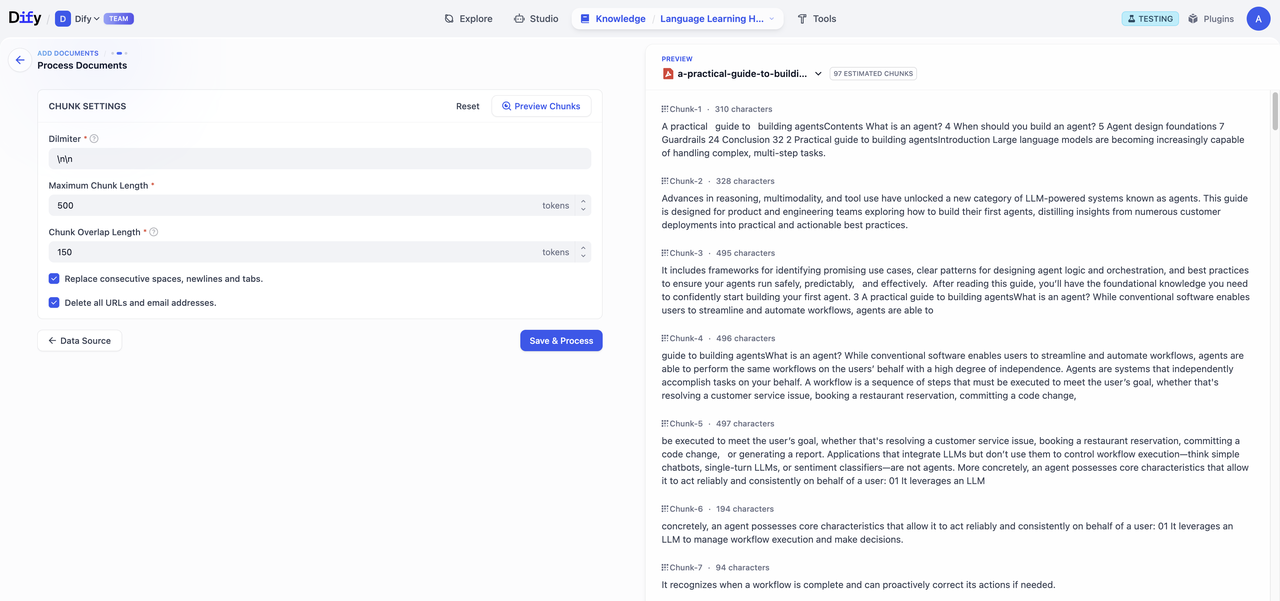
2. **Fill in Processing Parameters and Preview**\
   If you configured user input fields during pipeline orchestration, users will need to fill in the required parameters and variables at this step. After completing the form, click **Preview** to see chunking results. Click **Save & Process** to complete knowledge base creation and start data processing.
   <Warning>
     Important reminder: Chunk structure remains consistent with the pipeline configuration and won't change with user input parameters.
   </Warning>
   <img src="https://mintcdn.com/dify-6c0370d8-add-new-agent/Lg4D_pUS5gs8ND0D/images/knowledge-base/create-knowledge-pipeline-18.png?fit=max&auto=format&n=Lg4D_pUS5gs8ND0D&q=85&s=e71da2569984483b8ac006222a625355" alt="Parameter Input" width="1280" height="601" data-path="images/knowledge-base/create-knowledge-pipeline-18.png" />

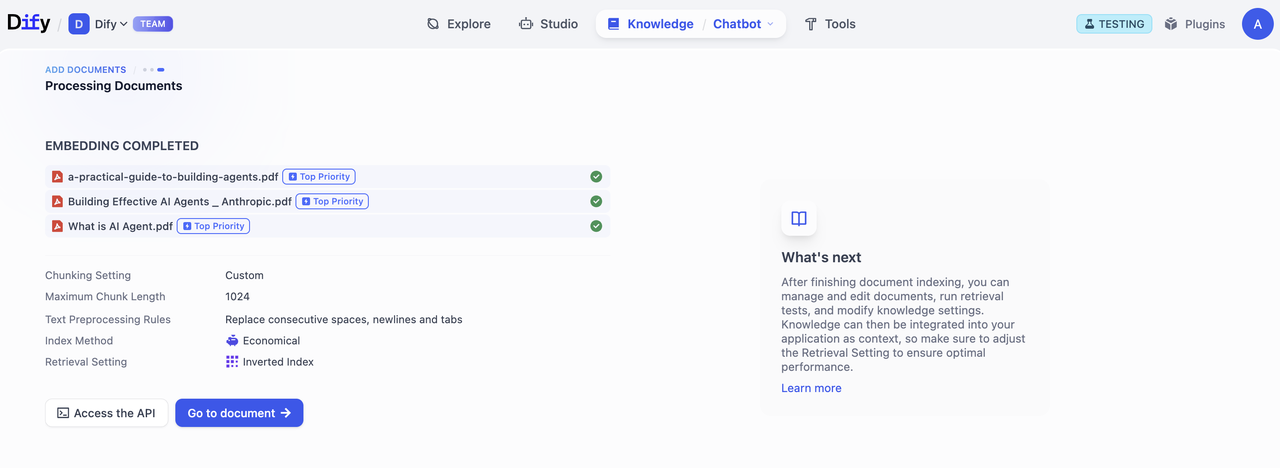
3. **Process Documents**\
   Track the progress of document processing. After embedding is completed, click **Go to Document**.
   <img src="https://mintcdn.com/dify-6c0370d8-add-new-agent/Lg4D_pUS5gs8ND0D/images/knowledge-base/create-knowledge-pipeline-19.png?fit=max&auto=format&n=Lg4D_pUS5gs8ND0D&q=85&s=487bcb8001e7f79ca6b7b3d6fd86b888" alt="Processing Progress" width="1280" height="468" data-path="images/knowledge-base/create-knowledge-pipeline-19.png" />

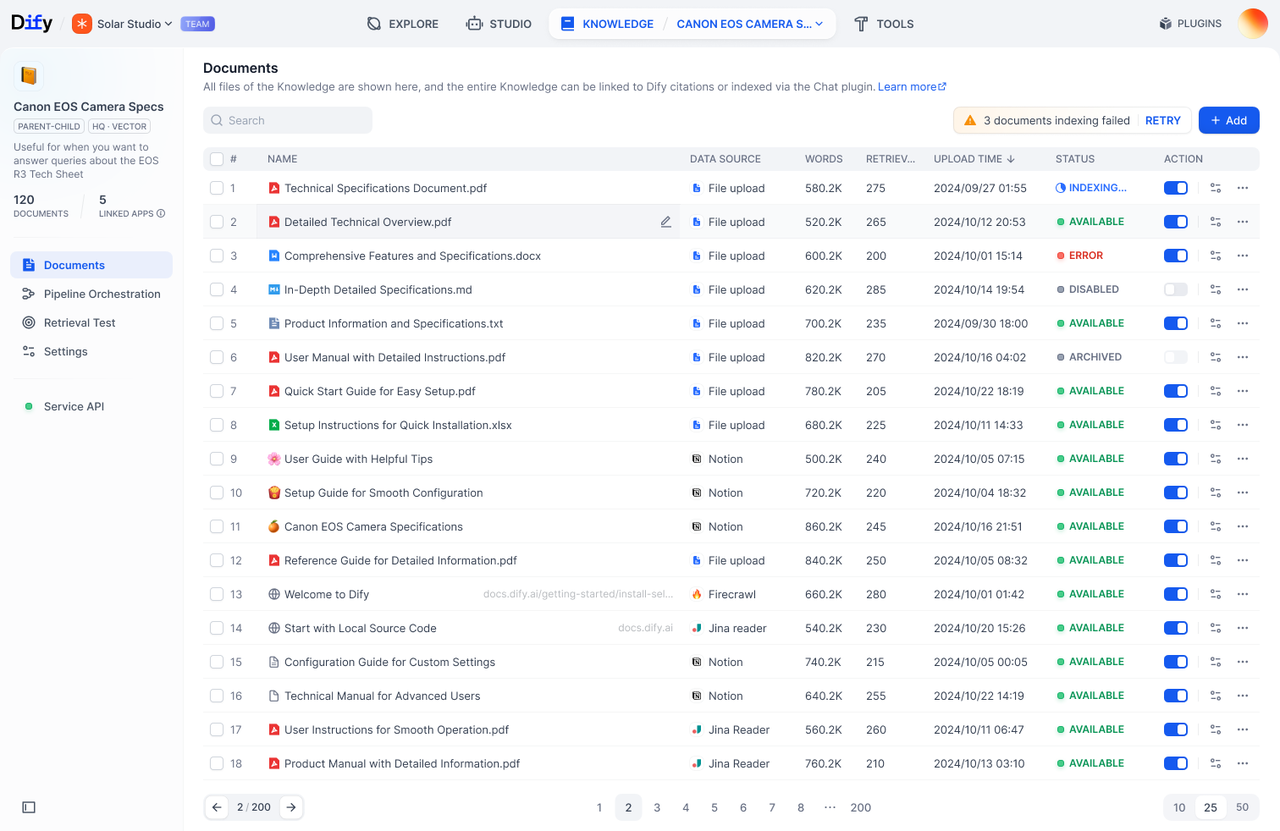
4. **Access Documents List**\
   Click **Go to Documents** to view the Documents page, where you can browse all uploaded file, processing status, etc.
   <img src="https://mintcdn.com/dify-6c0370d8-add-new-agent/Lg4D_pUS5gs8ND0D/images/knowledge-base/create-knowledge-pipeline-20.png?fit=max&auto=format&n=Lg4D_pUS5gs8ND0D&q=85&s=41ea9f3f8a7acfd6cf2f1d719cbf2dd3" alt="Documents List" width="1280" height="831" data-path="images/knowledge-base/create-knowledge-pipeline-20.png" />