> ## Documentation Index
> Fetch the complete documentation index at: https://dify-6c0370d8-add-new-agent.mintlify.site/llms.txt
> Use this file to discover all available pages before exploring further.
# Runtime
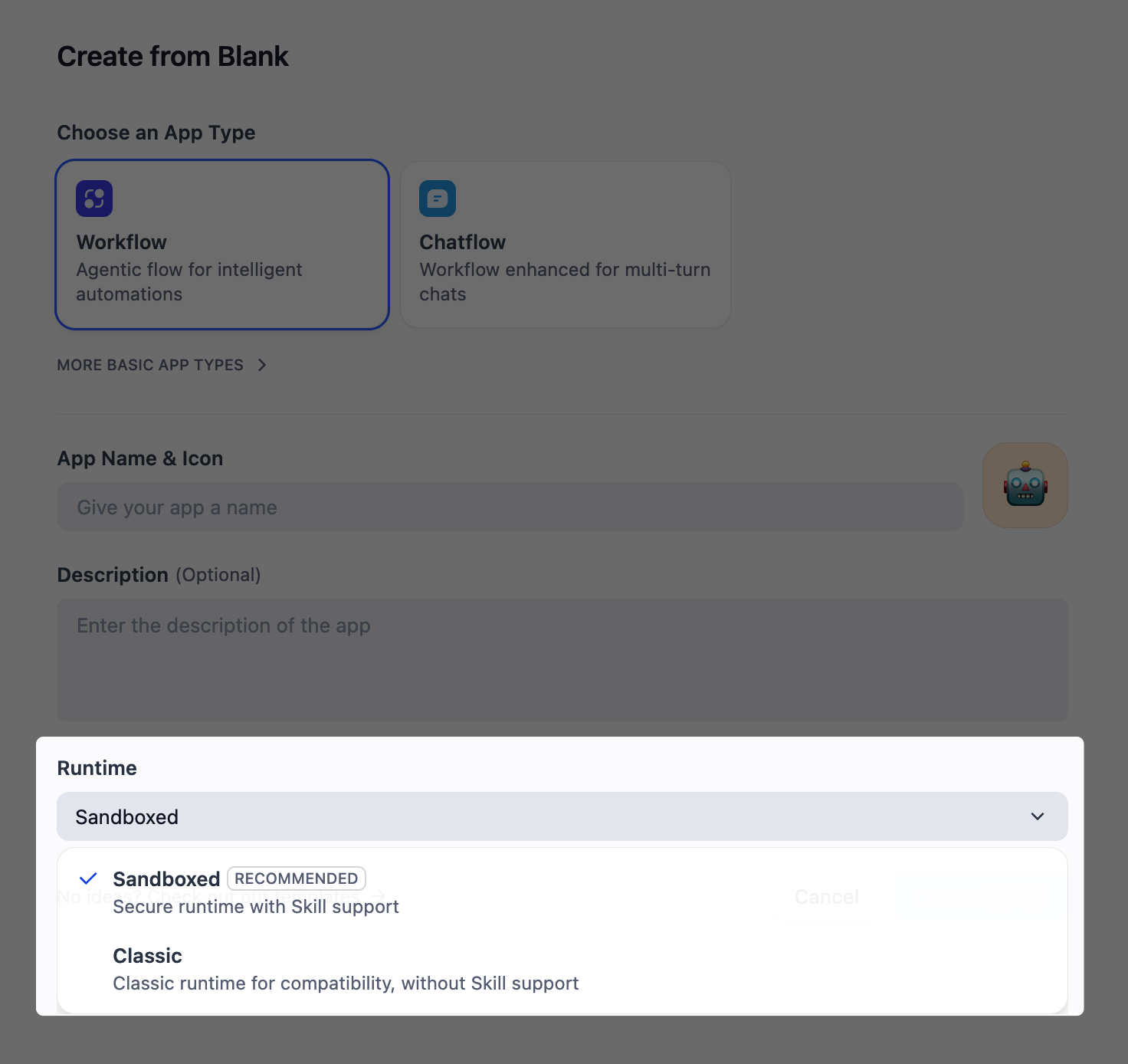
Runtime is the execution environment where your workflows run. It sets the boundaries for what LLMs can access and do.
Dify offers two runtime environments: **Sandboxed Runtime** and **Classic Runtime**, each optimized for different use cases.
 ## Overview
**Best for:** Complex tasks where LLMs need autonomy to solve problems their own way. More powerful, but slower and more token-intensive.
Sandboxed runtime enables LLMs to **execute commands** in an isolated environment. Anything you can do with commands in a terminal, they can do:
* **Run scripts and programs** - Execute code to process data, generate outputs, or perform any computation
* **Install what's needed** - Download libraries and tools on demand using pip or other package managers
* **Access external resources** - Fetch files from URLs, clone repositories, or retrieve data from external sources
* **Work with files** - Access resources like **[skills](/en/use-dify/build/file-system#skills)** in the [file system](/en/use-dify/build/file-system), process files across formats, and generate multimodal artifacts using scripts and tools
In sandboxed runtime, the Agent node combines the roles of both the LLM and Agent nodes in classic runtime.
For quick, simple tasks that don't need these advanced capabilities, you can disable them by turning off **[Agent Mode](/en/use-dify/nodes/agent#enable-command-execution)** for faster responses and lower token costs.
**LLMs become true agents**. As long as the model has strong tool calling and reasoning abilities, it can determine what commands to run and execute them to complete tasks autonomously.
LLMs are more powerful, and that's exactly why they need to run in a sandbox. The isolated environment gives them enough freedom to work while ensuring safe operations.
For the default sandbox provider:
* Dify Cloud uses E2B.
* Self-hosting deployments use SSH VM.
Choose and configure other providers in **Settings** > **Sandbox Provider**.
**Best for:** Quick, straightforward tasks. Less powerful, but faster and more efficient.
Within classic runtime, LLMs do what they do best: analyze information, generate text, reason through problems, and intelligently use pre-configured tools to complete tasks.
Think of it as giving someone a specific toolkit—they're capable, but **limited to what you've provided**.
## Quick Comparison
| Dimension | Sandboxed Runtime | Classic Runtime |
| :-------------------- | :---------------------------------- | :------------------------- |
| **Best for** | Complex, autonomous problem-solving | Simple, well-defined tasks |
| **LLM Autonomy** | Runs any command it needs | Uses tools you configure |
| **File System** | ✅ | ❌ |
| **Skills** | ✅ | ❌ |
| **App Export Format** | `.zip` (DSL + file system content) | `.yml` (DSL) |
## Upgrade to Sandboxed Runtime
You can upgrade a classic-runtime application to sandboxed runtime. A copy of your application is created and upgraded, with the original one unchanged.
## Overview
**Best for:** Complex tasks where LLMs need autonomy to solve problems their own way. More powerful, but slower and more token-intensive.
Sandboxed runtime enables LLMs to **execute commands** in an isolated environment. Anything you can do with commands in a terminal, they can do:
* **Run scripts and programs** - Execute code to process data, generate outputs, or perform any computation
* **Install what's needed** - Download libraries and tools on demand using pip or other package managers
* **Access external resources** - Fetch files from URLs, clone repositories, or retrieve data from external sources
* **Work with files** - Access resources like **[skills](/en/use-dify/build/file-system#skills)** in the [file system](/en/use-dify/build/file-system), process files across formats, and generate multimodal artifacts using scripts and tools
In sandboxed runtime, the Agent node combines the roles of both the LLM and Agent nodes in classic runtime.
For quick, simple tasks that don't need these advanced capabilities, you can disable them by turning off **[Agent Mode](/en/use-dify/nodes/agent#enable-command-execution)** for faster responses and lower token costs.
**LLMs become true agents**. As long as the model has strong tool calling and reasoning abilities, it can determine what commands to run and execute them to complete tasks autonomously.
LLMs are more powerful, and that's exactly why they need to run in a sandbox. The isolated environment gives them enough freedom to work while ensuring safe operations.
For the default sandbox provider:
* Dify Cloud uses E2B.
* Self-hosting deployments use SSH VM.
Choose and configure other providers in **Settings** > **Sandbox Provider**.
**Best for:** Quick, straightforward tasks. Less powerful, but faster and more efficient.
Within classic runtime, LLMs do what they do best: analyze information, generate text, reason through problems, and intelligently use pre-configured tools to complete tasks.
Think of it as giving someone a specific toolkit—they're capable, but **limited to what you've provided**.
## Quick Comparison
| Dimension | Sandboxed Runtime | Classic Runtime |
| :-------------------- | :---------------------------------- | :------------------------- |
| **Best for** | Complex, autonomous problem-solving | Simple, well-defined tasks |
| **LLM Autonomy** | Runs any command it needs | Uses tools you configure |
| **File System** | ✅ | ❌ |
| **Skills** | ✅ | ❌ |
| **App Export Format** | `.zip` (DSL + file system content) | `.yml` (DSL) |
## Upgrade to Sandboxed Runtime
You can upgrade a classic-runtime application to sandboxed runtime. A copy of your application is created and upgraded, with the original one unchanged.
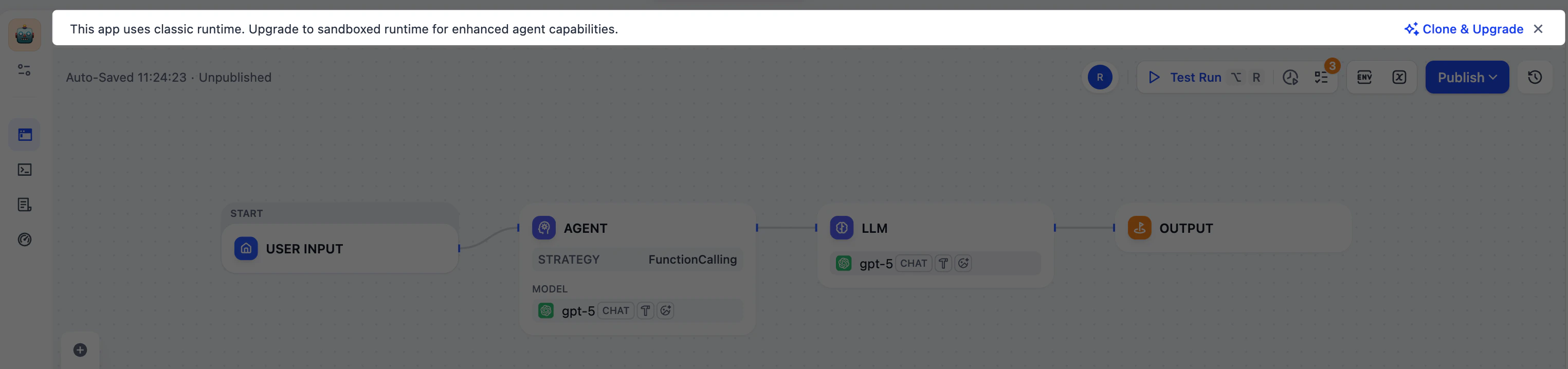 During the upgrade, all classic Agent and LLM nodes are converted to the sandboxed [Agent node](/en/use-dify/nodes/agent). Their existing configurations are automatically mapped to the new node format.